 Ecter's Trash
IFF Reader - The Green One
Abandoned project, might rewrite later
It's here: trash.ecter.net/iff-reader
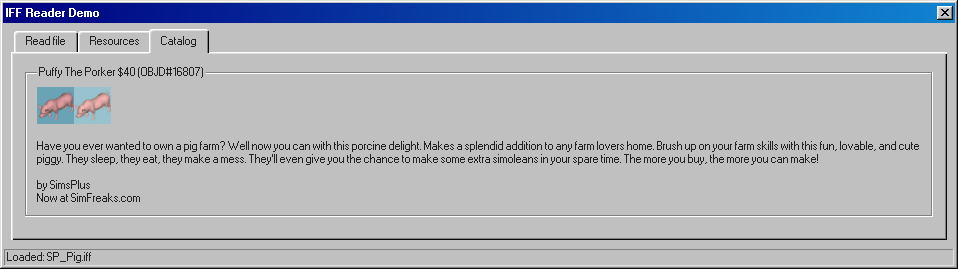
There isn't much to say about this. I tried to see if i can write something that parses IFF files used for content in The Sims (both the 2000 original and the recent rerelease).
The original goal was to make something that would output catalog descriptions of furniture found in an IFF file. Haven't finished it, because i gave up trying to parse sprites needed to draw the thumbnail (if the prerendered one wasn't present in the file).
But the approach was flawed. Trying to work with jDataView library in JS wasn't easiest, and it limited my options for future improvements (i'd have to rewrite everything if i wanted to add a way to edit IFF files in it).
At least i learned more about how IFF files are structured, so any future attempts will be slightly easier c:
Next time i'll just try to use C# and import libraries from FreeSO project.
How it complements other tools
Fun fact! IFF usage varies a lot between The Sims itself and several tools. One good example is a food horn item downloadable from SimFreaks site. For a while it was considered impossible to clone with The Sims Transmogrifier (an essential tool for creating The Sims custom objects, tmog for short) - you could use it in the game, view it in TMog, but attempts to clone it or export for editing its sprites failed.
How about the second most important tool for editing The Sims objects, IFF Pencil 2? It opened the file, but only showed a few resources from it, making it useless. Meanwhile, my IFF Reader (turns out a tool with the same name exists already, so i had to rename mine to "IFF Reader (Green)") opened it with no problem and showed all resources present in it.
Turns out, every IFF implementation differs in how it handles resource map ("rsmp" type resource) information inside of files. In case of the food horn object, there were incorrectly blanked out resources in the file, but rsmp still linked to them. Let's walk through how each tool deals with it:
- The Sims Complete Collection
- Since it managed to open the broken food horn, it seems to be using rsmp. It manages to discard broken resources referenced by the map as if they weren't present.
- Haven't tested it in Legacy Collection, but i assume it's exactly the same.
- Transmogrifier
- It reads based on rsmp, so if you have an entire valid object inside of an IFF file, but resources are not in the map, TMog will not show it.
- For normal program views, it only reads data relevant to what is displayed - catalog strings, object definition, sprites etc. Other resources being invalid won't break it.
- During cloning and export / import you may pick which object from a file (IFF files can hold several objects, e.g. "shrubs.iff" has all shrubbery from the base game) and tries to include all necessary data while omitting unused ones (when you clone the tiny shrub, you don't need sprites and catalog descriptions from all other ones). But it will walk through all resources, even ones that you can't see in TMog's views, like tuning strings (STR#) or sound event names (FWAV).
- That's what made it fail to clone/export the food horn - rsmp pointed it to a specific place in the file where it expected a valid FWAV resource, but got null instead of 4 characters where the type code should have been.
- IFF Pencil 2
- It seems to read file contents, but ignores resources of type "XXXX" as if they were deleted (which is the intention behind this type).
- Resources of types other than XXXX that are not referenced by rsmp may still be displayed.
- It will corectly modify rsmp whenever you edit the file. But it seems to redo the file from scratch when you add / import resources into it. I had an object with unused resources not mentioned in rsmp and when i used IFF Pencil 2 to import data into it, order of data in the file changed and all unused information was gone. This could potentially break an object that used to work in the game before the edit, so beware!
- It failed to display food horn, because the first broken resource says it has zero length, making sequential read impossible - only rsmp-based parsing worked for this one.
- IFF Reader (Green)
- It does not look at rsmp for reading file contents, just reads resources sequentially.
- It treats XXXX (deleted resources) like any other and displays them, letting you know what unused data is left over there.
- It completely fails to read the original broken food horn (for now at least!) due to invalid data types. It's that difference that pointed me in the right direction.
- After trying to fix it, it behaves closer to IFF Pencil 2. It makes me think that the game and TMog do consult rsmp first, because otherwise i can't imagine how else they were able to read this specific file.
- For all other broken files (the food horn has earned my nemesis status in this project, for sure) it shows more than Pencil does. But for the food horn... It's gonna be my edge test case if i go back to work on this reader.
- Codex
- Sequential read. Misreads the food horn in a very unique and glitchy way. Opens files with objects not visible by the game (all resources present, but not referenced in rsmp)
- Displays XXXX resources in its "raw" view.
- SimCategorizer
- Reads based on rsmp, still fails on food horn (like TMog's clone/export).
- SimOrganizer
- Sequential read, not rsmp-based. So it may display items that the game does not load, and fail on ones that work in the game (including the food horn).
Long story short:
- If the object appears in Transmogrifier - it's likely to work in the game.
- Even if it fails to load in IFF Pencil or IFF Reader (Green)
- If it doesn't appear in Transmogrifier but in Pencil/Reader you see all needed resources (including OBJD), it might mean they're not in rsmp
- Before you edit in Pencil, check in Reader (Green) if there are any deleted "XXXX" resources and export them just in case.
- Editing in Pencil (like adding a new resource, deleting it and saving) will recreate rsmp properly.
- If it doesn't appear in Transmogrifier and in Pencil you don't see OBJD, you may find an XXXX resource that matches OBJD format.
- You may use Reader (Green) to export it and Pencil to import to fix the object.
Recovering some junk data
So after all that, i made tiny edits to IFF Reader (Green) to make it more useful in my "fixing broken IFFs" adventures, since it already helped me a lot when investigating issues not easily seen through other programs. Now under each resource there is a floppy button that exports its data to a .bin file, which can later be imported into IFF Pencil 2. This is gonna help me recover resources that pencil doesn't display (because they're missing from rsmp).
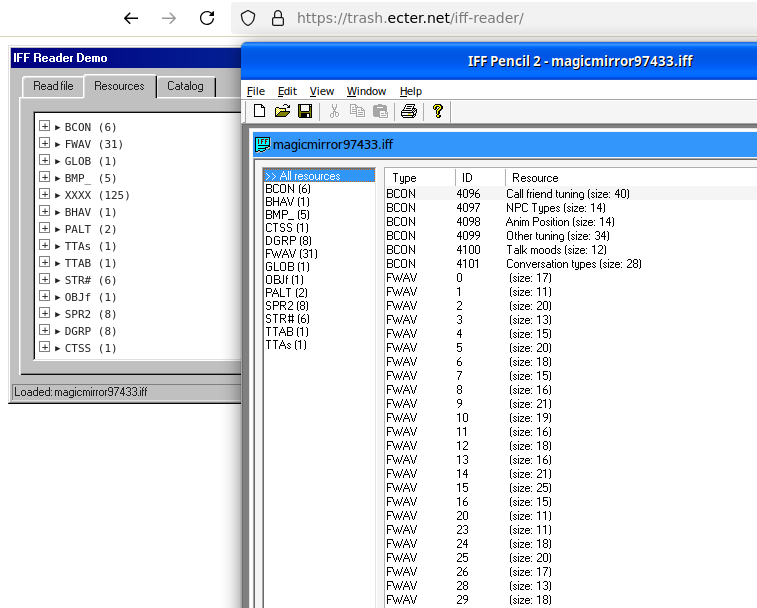
Example workflow for an issue i've already seen in three different objects:
- Diagnose:
- A file does not seem to have OBJD (object definition) so it does not let you use the object in the game or TMog.
- Turns out there are XXXX resources with IDs matching the one from the original object that this custom one has been a clone of!
- No XXXX resource is visible in IFF Pencil 2, because that's the type you mark data you want deleted, but IFF Reader (Green) does show them.
- Prepare:
- First, copy the IFF and open it in IFF Pencil 2 - leave the original broken one for reference!
- Now, export XXXX with the right ID, e.g. "16807" to a .bin file.
- Fix:
- Import "XXXX_16807.bin" file into the copied IFF (leave the original intact!) using the data-only import type and set its type to OBJD.
- Optionally, you can copy its name, like "Phone - Wall", from Reader (Green) and put it as the resource name. You may leave it empty too if you want, it's up to you.
- Now, both the game and TMog should show the object correctly!
This has worked for three objects with this specific issue (i'm starting to believe there's a tool that causes such issue - perhaps an old version of catalog categorizer or something else that modifies OBJD in a destructive way). Whenever you find an IFF file that seems to be missing OBJD, give this tool a try to see if there are remnants of it to be recovered! This will retain object's GUID, pricing, categorization and all other data kept in object definition.
If you wanna try it out
Good luck. It's provided as is (and i can't guarantee it won't blow up literally a week after i post this). If you have IFF files with either custom content or extracted from the game, you can give it a try. It's not using any kind of backend, all parsing is going to happen in your browser.
P.S.: Shout out to SimFreaks discord server and all the helpful people there! Their creativity tends to inspire me to keep making stuff here or there. Even if it's a very clunky IFF parser :v